Monday, 30 May 2016

The 10 Things People Still Get Wrong About Local SEO by @neilpatel

SEO has always been a breeding ground for misinformation. With local SEO, this has created a lot of problems for small businesses on main street, trying to follow the rules and keep pace with the changes.

Needless to say, this is a challenge for local business owners.

It’s like diagnosing and treating yourself based on what someone told you a friend read on WebMD.

Despite search engines pushing to get better content in front of the people who need it, we’re still seeing a lot of myth and incorrect information surrounding local SEO.

Here are ten myths that you should be aware of.

1. Targeting Keywords for Local Search is Irrelevant

Updates like Hummingbird did have a significant impact on the future of search. Hummingbird prompted content products to adopt a new mindset – one that benefits the end-user.

With that said, if keywords are still being used for search, and they’re still showing on the first page of Google, then they still matter.

According to Matt Cutts, 90% of searches were expected to be impacted by Hummingbird. It wasn’t an update like Panda or Penguin. Rather, Hummingbird was a complete revamp of the algorithm.

Rand Fishkin, the founder of Moz, stated that less than 15% of the ranking equation is wrapped up in keyword targeting. Instead, he suggests focusing on offering unique value, rather than unique content, which is what SEO’s tried to achieve before.

Algorithm changes like Hummingbird actually tell us that it’s important to know the reason behind a particular keyword being used and creating content for a local audience that meets that need.

Without keywords, you would never know the searcher’s intent.

According to Brian Dean, “Keywords are like a compass for your SEO campaigns; they tell you where to go and whether or not you’re making progress.”

2. You Can Remove Your Business Listing From Google

Sometimes a business ends up with duplicate listings in Google. I’ve seen and heard recommendations for business owners to claim those additional listings and then delete them from Google’s system using the Google My Business Dashboard.

But “deleting” a business listing from Google doesn’t actually delete it. It does clear all the content including posts, videos, and photos along with any associated AdWords ads.

Then it marks it as an unverified listing.

The listing still exists on Google maps and, provided you didn’t clear category data for the listing; it can still rank.

This is even clearly defined in the Google Help Center:

When you delete a local page, the corresponding listing will be unverified and you will no longer be able to manage it. Google may still retain business information from the page and may continue to show information about the business on Maps, Search, and other Google properties, including marking the business as permanently closed, moved, or open, depending on the information that’s known about the business.

3. Google+ Content and Posts Help Improve Local Ranking

Nope. Even when Google+ was tied into search with the ability to +1 content you found, it still didn’t contribute to local search rank.

There was believed to be social authority involved, but Matt Cutts has already stated social signals are not a ranking factor.

It’s pretty much impossible for Google+ content to pop in search unless someone is specifically looking for a local brand. Your Google+ page doesn’t get included in the local business pack in search, either.

And link posts within your Google+ don’t contribute the way you think they do. Any social links in Google+, Twitter, etc. are no-followed.

You’ll get referral traffic if your audience is active there, but SEO value is a no-go.

4. Professional/Practitioner Listings (Like Lawyers) are Duplicate Listings

This is a common question where practitioner listings can appear and there’s concern that they’re duplicates – so the natural approach is to remove them.

Example: Google creates individual listings for the public-facing professionals in a legal office. The owner of the practice doesn’t want those individual listings to show up at all.

There are two methods of recourse here:

  1. You can request that non-public facing staff be removed, like back-office professionals, and Google will remove them if they’ve been created.
  2. If your business only has a single public-facing individual like a firm with a single owner, then it’s a solo practice. Google will merge the listing of the professional with that of the office.

If neither of those cases applies, the listings stick until the professional in question is no longer a part of that business.

But they’re not duplicate listings and do no harm to your local search rank.

5. Trackable Phone Numbers in Business Listings

Local businesses often aim to get their brick and mortar listed across a number of directories – it’s a smart approach to local search visibility.

Some business owners will use call tracking numbers to track the performance or effectiveness of those local listings, so they know how customers found them.

This can negatively impact your local SEO efforts.

Google cross-checks your NAP footprint (name, address, phone number) to verify the information and uses it as a factor when ranking local businesses.

An inconsistent NAP footprint reduces confidence in your business and can reduce your search visibility.

6. Using Google My Business Listing Categories Like Keywords

10 Things People Still Get Wrong About Local SEO | SEJ

This is one of the most common mistakes up there with having no categories at all.

The categories on your Google My Business profile page are like the sections of the Yellow Pages. It’s how Google knows to display your business for relevant searches.

You want to add a couple relevant categories, with your top category being the primary category for your business.

Don’t go overboard though. Google recommends using as few categories as possible to describe your business.

If you start throwing in irrelevant categories or try using categories like keywords it can hurt your listing.

7. Claiming a Google Listing Will Automatically Increase Search Visibility

You should absolutely claim your business listing in Google so you have full control over it, but the mere act of claiming a listing isn’t going to have any impact on local SEO.

You need to go a little further.

Optimize the listing and stay consistent with how you optimize your business listings.

Google frowns on inconsistency, so frequent changes can hurt you – especially with your business name. Consistency in your listing once it is claimed and optimized goes a long way.

This includes consistency across guest posts, social media content and any other sites that link to you.

If you really want your local listing to work in your favor, get others to link to it.

8. A Huge Radius Will Make Me Rank Better for Local Cities

If you’re a service-based business then Google will let you set up a radius around your business address that shows how far you’re willing to travel to provide that service to your customers.

It’s common for business owners to set the radius to the maximum distance, or as wide as possible, because they think it will help them appear in local search for the cities within the radius.

That’s not how the local radius works. It’s there to provide value to the end-user, not as a ranking metric. More than likely you’re still just going to rank for the city in which your business resides.

10 Things People Still Get Wrong About Local SEO | SEJ

9. Mark Old Locations as “Closed” in Google

The last thing you want to do when you relocate your business is flag the old location as “closed” and try to establish a new listing.

The only thing that accomplished is placing a red “permanently closed” notification on your old listing. The end-user has no idea if you’ve actually moved. They just know you’re not there anymore.

If you have a verified listing with Google then just go into the Google My Business dashboard and update the address information to match the new location. Any other unverified listings can be flagged as “moved” to avoid any kind of confusion.

10 Things People Still Get Wrong About Local SEO | SEJ

10. Only Focusing on Maps SEO

Some businesses still get tunnel vision with map listings, doing everything they can to get a local map listing to pop up in the 3-pack with local SEO.

I’ve seen footer stuffing with city data, multiple micro-site creations with the same location data, and businesses purchasing volume reviews trying to get their local listing to show up at the top of the pack.

None of that is going to work the way they hope. In order for a business to gain rank locally and wind up in the 3 pack the website also needs to rank organically and develop strong local signals (NAP, citations, behavioral signals, domain authority, etc.).

10 Things People Still Get Wrong About Local SEO | SEJ

Conclusion

With the sheer volume of content out there along with the many hats that business owners wear, I shouldn’t be surprised that we still see local SEO mistakes like these. After all, we’re not all perfect. I’ve had my fair share of SEO mishaps and fumbles.

It’s a learning process, but hopefully these tips can help you avoid the mistakes that others are making as they try to build their local search visibility.

Have you come across any Local SEO mistakes besides the ones I’ve listed?


Image Credits

Featured Image: Vector Goddess/Shutterstock.com
All screenshots by Neil Patel. Taken May 2016.


10 Free Tools to Make Your Content Marketing More Effective by @dantosz

According to The Content Marketing Institute’s 2015 B2C study, 77% of companies use content marketing, but only 37% believe they are effective at it. That means a whopping 40 percent of brands are creating content they don’t think is effective.

Those numbers reflect a feeling many brands and business owners have—they know content marketing can work, but they aren’t entirely sure how to implement or track it successfully.

So, how can you stop wasting your time on content marketing practices that don’t work and start focusing your money and energy on effective content marketing practices?

These 10 free tools will help you do just that by helping you better create high-quality content, track your efforts, and share it with your audience.

content marketing

Hemingway Editor

The Hemmingway Editor helps you create clear, easy to read content by highlighting areas that are too complex. Content that is easy to read and understand is more likely to be shared, and may even rank better in Google. If you worry you aren’t a good writer, this app can help.

Grammarly

Editing your own work can be difficult. It is hard to see mistakes you made because your brain tends to see what it expects to see. This app has both free and paid versions, and will help you catch all those little grammar mistakes that spell check misses.

Buffer

Once you have written your posts, you need to share it with your audience. Buffer makes sharing on social super simple – just pick a day and time, then schedule your post to go out on Facebook, Twitter, or LinkedIn. They have both free and paid versions, but the free version will work just fine if you are only working on one social account per platform.

Google’s URL Builder

Google’s URL Builder allows you to create trackable URLs so you can tell where you audience is coming from. This allows you to figure out if your ads on Facebook are really driving traffic or if that sponsored post you paid for on another site really worked. Being able to tell if your content marketing strategies are actually working is vital to your success, and this free tool can help you do it.

Portent’s Idea Generator

“But coming up with ideas is so hard!” I hear this a lot. The truth is, ideas aren’t magic. They don’t come flying down from your fairy muse on glittery wings. They require a little work – and this idea generator helps make that work a little easier. Just enter in your subject, and the generator will start cranking out title ideas. Some of them need a little tweaking, but I like that it gets the creative juices flowing.

Buzzsumo

Another great tool for coming up with ideas is Buzzsumo, a tool designed to help you find the most shared topics on the web. So, you can see if people are talking about the topic you want to cover before you waste a bunch of time creating the piece. Plus, you can see what gets shared the most and use that to inform what you create. Are infographics about industrial toilet papers super hot? Are people sharing the crap out of articles about the germs spread by automatic hand dryers? Buzzsumo will let you know.

Co-Schedule’s Headline Analyzer

If you want people to read and share your content, you need to start with a catchy title. This title analyzer takes a research-backed approach to helping you write better headlines. All the great content in the world won’t do you any good if no one reads it! This will help you write better titles that will make people want to read (and hopefully share!) your content.

IFFT (If This Then That)

Creating high-quality content is only half the battle – then you have to make sure people read it. IFFT (if this then that) will make your life so much easier by allowing to you to connect tons of apps you already use. You can use it to automate social sharing or help you keep up with all those ideas running through your brain.

There are tons of recipes to choose from, but I recommend this social media tracker, this recipe that shares a new WordPress post to Facebook, and this on that sends notes you speak to SIRI to Evernote (great for keeping up with ideas for new blog posts!)

Canva

Want to create beautiful images? Canva is the place to go. There are tons of images you can create for free, or you can choose to pay for upgraded (usually just a dollar or two) templates and images. It also saves images you have created, so if anything happens to your saved file, you can easily re-download.

Easel.ly

It is easy to get caught up in the mindset that content means blog posts. In reality, there are tons of different content types you can create – including infographics. In a perfect world, you would be able to hire a company to do all the research and create a slick infographic. That isn’t always possible, which is where Easel.ly comes in. They make it easy to create great looking infographics using templates. All you have to do is plug in your info and you are ready to publish.

The Takeaway

Creating high-quality content doesn’t have to require a huge budget. All you need is a dedication to creating and publishing high-quality content that your audience will be interested in interacting with. Are there other free tools you use in the content creation journey? Please share in the comments section!

Want to Learn More?

Are you interested in learning more about how to create high-quality content on a consistent basis? Sign up for a FREE webinar and join me and the SEJ Think Tank on June 1st to learn about streamlining the content creation process. I will be giving tons of tips on creating content on a regular basis.

Register now to get your learning on. 

Capture

register

Image Credits

Featured Image: Kamira/Shutterstock.com
In-post Photo #1: weedezing/Shutterstock.com
In-post Photo #2: Image by Paulo Bobita


Sunday, 29 May 2016

The Pros and Cons of Twitter Automation by @mgeorgiou22

Automation has a strong role to play in lessening the burden on social media managers and entrepreneurs while enhancing their presence on Twitter and other social platforms. There are a number of tools that help us be omnipresent on Twitter. Automation is cool and convenient. It helps you meet your stipulated quota of posts each day without taking up too much time or you having to worry about that question which never goes away —

Automation is cool and convenient. It helps you meet your stipulated quota of posts each day without taking up too much time or you having to worry about that question which never goes away — What do I post about today?

Twitter Automation: Proceed With Caution | SEJ

However, as with any kind of automation, a human touch is still required. 

I’m all for automation, but it should be but a small part of your overall strategy. Businesses that put their social media presence on auto-pilot can land into some trouble with their audience. Here are just a few of the issues with automation that could hurt your campaign:

Appearing Robot-Like

Personality is what drives social engagement. That imperfect grammar, those occasional typos – they look like they were made by a human who composed the tweet on the go through his or her iPhone. With too many automated tweets, you risk sounding like a robot, especially if your tweets were written at leisure – followers can usually tell what’s spontaneous or not. There is something disconnected and formulaic about tweets that were composed earlier and set to appear at certain times.

Too many automated tweets could make you seem dry and robotic. Not recommended if your aim is to generate user engagement.

What to do about it: Don’t automate all your tweets. Use the platform for real-time engagement with people as well. Bring your real self to the party whenever possible!

PR Disasters

You schedule a tweet for a particular time and you obviously don’t know what’s going to be trending at that hour. If there happens to be a tragic story trending, your tweet run the danger of looking out-of-place and insensitive. 

ISIS bombed yet another city in Europe. People are horrified. There is widespread outrage on Twitter. There is precious else that people want to talk about since everyone is (rightly) worried about our collective future.

And then appear a series of your tweets within the space of a few hours. Something to the effect of “Check out my new ebook!” or an image of your team having fun in Hawaii.

Obviously, this is poor timing and may make you seem insensitive or oblivious to the world, which is not a good thing in this era of cultural connectivity, unprecedented awareness, and instant access to information from around the world. Of course, it wasn’t intentional on your part, but perception is everything.

What to do about it: The moment there is a big development like the one mentioned above, hold off on the automated tweets for a bit. But that is only possible when you are already aware of the breaking news and time differences across zones might make this tricky.

One of the good things about Twitter automation is your tweets can appear when you are sleeping. If your target audience is global, this is helpful as it keeps your name or the name of your brand visible.

If an automated tweet does appear before you are able to catch up on the news in your part of the world, follow up with a live one to express your condolences. Twitter is a global platform and it’s often here that people discover breaking news. (One study found that Twitter users tend to be highly interested in news.) Few of us can afford to remain ignorant or live in our little bubbles. While it is great to be absorbed in the day-to-day running of your business, it is also helpful to know what is going on in the world and participate in the greater conversation that is Twitter.

A Lack of Response

Someone responds to your automated tweet – congratulates you, asks a question, or points out a broken link in the tweet, and there is no response from you – because, of course, it’s a program posting for you, not you yourself. Awkward.

Say this happens early in the AM. You have another tweet scheduled to appear in another hour. The person who pointed out your broken link sees the new tweet and wonders – did you even read my comment, Mr. I-Know-Everything-About-Social-Media?

What to do about it: Catch up on the comments when you get online and respond to them. Delayed response is better than none. People understand not all of us are glued to our Twitter all the time.

Harm to Your Company’s Reputation

Now this is different from merely acknowledging a comment or starting a conversation with a stranger. Many brands use Twitter as part of their customer service. Customers expect quick responses to their queries on social. People tend to get impatient on social, since it’s a live platform where delays in addressing queries are taken as a lack of professionalism.

With automated tweets, however, businesses give people the impression they are online all the time, encouraging customers to engage with them. If there is no response, customers might feel they are being ignored.

Worse would be for a customer query that has not only not been acknowledged to be followed by yet another automated tweet – completely oblivious to the customer’s grievance.

What to do about it: Post the hours you will be available for addressing customer queries, preferably every day at the time of signing off. 

Critical Remarks Left Unaddressed

When someone criticizes you, your business, or merely a tweet of yours, you don’t want to leave those negative vibes floating around for long. Leaving criticism unaddressed (we are not talking about trolls, but criticism which people feel justified in making) can potentially harm the reputation of your brand.

What to do about it: With automated tweets you might not be around to address the remarks in real time, but you want to do that soon as you are back online to contain the damage.

People are usually forgiving when businesses not only apologize for the inconvenience caused to their customers but also for delayed responses.

Automatic Favoriting, Follow-backs, and DMs can be Detrimental

With the help of certain IFTTT Twitter recipes, individuals and businesses can auto favorite tweets, auto follow back new followers, as well as set-up automated DMs, among many other things.

Unfortunately, automation exercises no discretion. Merely selecting certain keywords and setting up a recipe to favorite tweets that contain those words, or even posts made by certain people, can lead to embarrassing stuff given the uncertain nature of what others might post.

Auto following back spammy businesses or individuals with dodgy records doesn’t serve you either. Also, Twitter limits the amount of accounts you can follow. You don’t want to waste those follows on spammy or useless Twitter users!

What to do about it: You need to know what is being favorited in your name. Immediately unfollow people or businesses that do not inspire confidence in you. We are a bit ambivalent towards auto-DMs, though they could work with personalization and humor. Don’t cram it with information people can easily find on your profile – I love Internet Marketing and chasing rabbits in my spare time. For whatever reasons, it’s just not the same as sending people a welcome email. They haven’t subscribed to your blog; they have simply followed you on Twitter. Act accordingly!

Use Automation Wisely for Maximum Benefits

Twitter automation is a great help for small businesses and busy individuals. Scheduling tweets takes a load off your shoulders. But at the end of the day, it’s just a tool, programmed to function a certain way. Don’t let it lull you into a false sense of security.

The ultimate goal of a social platform is engagement. Automation cannot be a substitute for that. Automation or not, you still have to be alert to know what’s going on with your Twitter profile and be quick to act.

Image Credits

Featured Image: Image by Imaginovation. Used with permission.
In-post Image: Image b
y Imaginovation. Used with permission


Saturday, 28 May 2016

SERPs Success: An #SEO Game Plan for Impatient Marketers by @IAmAaronAgius

SEO is a long-term strategy.

You have to work hard to develop a body of highly optimized content for readers, and then you have to make efforts off-site to prove the relevance and authority of your website to search engines.

For the impatient marketer just starting out with their SEO strategy, the task can seem less than worthwhile. If this sounds familiar – and you need some quick SEO wins – this blog post is for you.

Here’s an eight-step SEO game plan for impatient marketers.

Step 1: Make Sure You’re Optimized for Mobile

First things first:

Is your site mobile-compatible? If not, this is one of your most important SEO tasks.

If you’re not sure, you can check right now using Google’s Mobile-Friendly Test:

Mobile Friendly Test Website Screenshot

Just enter your URL and Google will tell you in seconds.

Optimizing for mobile is a really important step to get quick gains in SEO. For one, people in the US are now spending 61% of their time online using a mobile device. If someone accesses your site through mobile, and it’s not optimized, they’re much more likely to bounce, which is going to affect your results in SERPs.

And have you heard of Mobilegeddon? This is what marketers are calling Google’s April 2015 ranking algorithm update – one that was designed to boost the rank of mobile-friendly pages in search.

Step 2: Create a Site Map

If you’re already mobile-compatible, then the next step is making sure you have a sitemap.

A sitemap gives search engines detailed information about what pages are on your website, which will make it easier for them to crawl it. You can create one using XML Sitemaps for free (up to 500 pages).

XML Website Screenshot

If you use WordPress, there are simple plugins you can use to build a sitemap, such as Yoast. Otherwise, take your XML Sitemap and upload it to the root file of your site like this: /sitemap.xml.

Step 3: Get Set up With Search Console

If you haven’t already, you should sign up for Google Search Console and Bing Webmaster Tools, and verify your website.

Then you can submit your sitemap to each search engine. Here are the instructions for Google, and here are the ones for Bing.

On Search Console, just go to your dashboard, click ‘Crawl’ on the side navigation, then ‘Sitemaps.’ You’ll then see the option to ‘Add/Test Sitemap.’

Google Search Console Screenshot

Then just follow the prompts to get it set up.

Step 4: Check Your Site Speed

Now that you’re on Webmaster Tools, it’s really easy to check your site speed. In Google Analytics, click the “Reporting” tab in the top navigation.

Then, in the side toolbar, click Behavior > Site Speed > Overview to see your data.
Site Speed Menu Screenshot

Site speed is an important rank factor for SERPs, and it affects your bounce rate. People are impatient – the slower your website loads, the more likely they are to leave. In fact, 47% of consumers expect pages to load in 2 seconds or less.

Site speed also has an impact on your conversions—a 1-second loading delay can cause up to a 7% loss in conversions. This means you should do everything you can to make sure your website runs as fast as possible.

Google offers its own speed suggestions in the Site Speed drop-down menu. You can also look into different site speed fixes based on your platform (WordPress, Weebly, etc.). Here are some other common ways your content or setup can slow down your site speed.

Step 5: Make Sure Google is Crawling Your Website Properly

It’s important to make sure that Google is crawling your site properly – if it’s not, your content might not appear in search results at all.

If you’ve already submitted your sitemap to Search Console, check their Crawl Errors Report to see if they had problems crawling any of your pages. You should check back with this often as your website grows.

If you don’t already have one, create a robots.txt file in Google Analytics. If you have one already, check and make sure it’s not blocking any important URLs.

There are also many external tools to help you crawl your website, including:

Step 6: Check for Missing and Duplicate Data

Next, you should run your own crawler to identify any missing or duplicate data. Most of the crawling tools out there are paid, but Screaming Frog will give you a free trial for up to 500 URLs.

Here’s what you should be looking out for:

  • Missing ALT tags
  • Missing (or duplicate) meta descriptions
  • Missing (or duplicate) H1 and H2 tags
  • Duplicate pages
  • 404 errors

Use this information to go back through and fill in any gaps in your website’s data.

Google doesn’t like websites with duplicate content, so it’s important to either block duplicate pages with your robots.txt file, or make the content unique.

Step 7: Start Optimizing for Local Search

Google is increasingly favoring locally optimized results for SERPs.

For example, if I search for “phone accessories,” Google doesn’t show me online retailers:

Google Search Screenshot for Cell Phone Accessories

Google used my IP address to highlight phone accessory options near me, before the first organic result.

So if you want some quick SEO wins, focus on local.

First, add your business to Google My Business. Add your business name, address, and phone number (NAP) and make sure the information is accurate.

Google compares your My Business NAP to your other NAP listings around the web. If there are discrepancies, it will affect your rank.

Next, you should go to the other popular search data providers and make sure your NAP is available for Google to find. Check Yelp, Bing, Yellow Pages, and other listings relevant to your industry.

You need to make sure your NAP is correct everywhere it appears. Moz Local can help you find your other listings using just your business name and zip code:

Moz Local Screenshot

For incorrect NAPs, either update it yourself or contact the website to tell them the information is wrong.

Step 8: Look for Long-Tail Keyword Opportunities

At this point, you’ve sorted out most of the technical issues that can really affect your SEO. Now, you have no choice but to move on to keyword optimization.

Still, there are some ways to get quick wins when trying to rank for keywords. The best one is looking for long-tail keywords.

Ranking for the most popular keywords in your industry can take years – or it could never happen at all – but if you find the right long-tail keywords to optimize for, you can shoot to the top of rankings.

According to Moz, a huge portion (70%) of keywords have relatively low demand.

Long-tail keywords are discovered by thinking about user intent. When your audience sits down at the search engine, what are they typing in?

For example, say I’m an online retailer of phone accessories. Ranking for keywords like “iphone case” or “screen protectors” will be difficult — you’d be going up against the biggest brands:

Google Search Screenshot for phone cases

But a lot of the time, your audience wants something specific. “Fast charge wireless charging pad” or “Galaxy Note 5 Flip Cover Case” are long-tail keywords that would have much less rank competition.

Finding good long-tail keywords is mostly about imagining user intent. Once you come up with some options, you can determine how relevant and competitive they are using Google Adwords.

If you’re searching for long-tail keywords in particular, I recommend using Keyword Tool Dominator. It uses Google autocomplete to help find relevant long-tail keywords right from search:

Keyword Tool Dominator Website Screenshot

Conclusion

There’s no getting around the long-haul optimization strategies if you want to get and maintain the highest rank possible. But if you’re just starting out with SEO, there are a lot of quick tricks you can use to jumpstart your efforts.

Follow the eight steps above to start your SEO game plan for impatient marketers.

Know of any other quick SEO tips that bring big results? Comment below with your suggestions.


Image Credits

Featured Image: FirmBee/Pixabay.com
All screenshots by Aaron Agius. Taken March 2016.


Friday, 27 May 2016

SearchCap: Google iOS app, food and brand queries & more

Below is what happened in search today, as reported on Search Engine Land and from other places across the web. The post SearchCap: Google iOS app, food and brand queries & more appeared first on Search Engine Land.

Please visit Search Engine Land for the full article.

Google App for iOS gets AMP content & sports highlights in Now cards

Brand queries: the AdWords performance illusion

google-adwords-yellow3-1920Experienced marketers know that where high-consideration purchases are concerned, it’s normal for customer journeys and purchase cycles to take weeks, or even months.

But many AdWords practitioners still look at each search session as the entire relationship with a user when looking at performance reporting.

These sessions are then analyzed and translated into bidding strategies and also influence campaign budget allocations. As a result, the sessions that are most highly valued are the ones that typically start with a brand query and are closer to the conversion event than shopper discovery sessions that are typically initiated with a generic category or generic product query.

To grow a healthy sales pipeline, it is essential for marketers to work the top of the funnel and spur introduction to the brand. This is how wise marketers feed volume to the bottom of the funnel, where the conversion events happen.

Targeting shoppers in the research phase involves testing generic keywords and category term keywords to discover which ones provide assists to the conversions that happen later on in the customer journey.

As an industry, we have become myopic with our AdWords strategies and are focused on optimizing a single event — typically last click — for a positive outcome instead of optimizing the customer relationship across multiple touch points for more sales and revenue over the longer term.

Conduct an AdWords audit

Are your own AdWords campaigns falling into the brand comfort zone? Your first step in figuring this out is to audit your campaigns. As you review, ask yourself these questions:

  • Are your ad groups set up in a way that lets you separate and compare your branded and non-branded ad group spend and performance?
  • What percentage of your AdWords campaigns spend is brand versus non-brand keywords?

If the answer to the first question is no, adjust your account structure to ensure branded terms and non-branded terms are not intermingled in the same ad groups.

Once this is complete, you should determine the level of incremental lift that the brand terms are providing. You can accomplish this by turning off the brand term ad groups in AdWords for a week and see the loss in AdWords revenue and the gain in Natural Search revenue.

This will give you a sense of what amount of additional revenue you would be getting from natural search results if you didn’t bid on this keyword. Then, use this information to determine how much you should be discounting the revenue in your ROI or ROAS calculation.

This discount will vary by industry and brand, but the most important thing here is to implement some sort of discount so you can balance your AdWords spend optimally throughout the purchase cycle.

Rebalancing your keyword portfolio

Once you have taken a discount percentage (for this example, we’ll use 30 percent), you can now look at the performance of your branded and unbranded ad groups with and without the discount.

This will give us a fresh look at how our AdWords campaign is performing and how we might rebalance our bids and the AdWords spend across our campaigns.

Rebalancing will optimize our campaign towards investing ad spend in capturing incremental sales and a bigger revenue pie, rather than the comfortable and myopic view of looking at and optimizing solely toward metrics like Return on Ad Spend (ROAS).

When fine-tuning the campaign, look at these factors:

  • Review brand terms one by one.
  • Analyze the Search Console report called “Search Analytic Report.”
  • Discover the click and CTR differential between when the brand terms were being bidded on and not bidded on.
  • Turn off keywords where the ads are not providing significant incremental clicks and value.

Reinvesting in incremental sales

Now that you’ve optimized your campaigns, you are ready to move some of the saved budget and reinvest it into keywords at the beginning of the purchase journey.

It is important for brands to be top of mind for users when they are shopping, so that when they get closer to their purchase, they include your brand with the product in their query, rather than that of your competitor. Brand also plays a large factor in both paid and organic search click-through rate (CTR); users tend to click on results where a recognized brand appears in the title or the URL.

To increase the likelihood of searchers typing in searches that include your brand, you must bid on generic terms earlier in the funnel. This is when shoppers are learning the brands that are relevant to their purchase consideration set.

Display advertising, content marketing and social advertising can also be a great way to ensure that your brand has top-of-mind association with a particular category or product/service. The increase in your CTR on your ads will have the positive second-order effect of increasing your AdWords Quality Score, reducing your costs of search advertising and increasing revenue later on in the purchase journey.

When you acknowledge the performance illusion of branded keywords, you have a chance to adjust your campaigns for true performance. You’ll see the long-term rewards are worth the effort.


Some opinions expressed in this article may be those of a guest author and not necessarily Search Engine Land. Staff authors are listed here.


(Some images used under license from Shutterstock.com.)

Share conversions and remarketing lists across paid search accounts

google-bing-2015a-fade-1920

At some point or another, anyone handling paid search at an agency has likely managed a client that had multiple accounts. Before concerns are raised at the idea of double-serving, let me explain that there are a lot of different legitimate reasons for why and how this can happen, none of which promote double-serving or are meant to game the system.

Here are some of the scenarios that could cause a client to go this route:

  • separated search and display accounts;
  • an account for each different product;
  • a brand account and a non-brand account; or
  • accounts for different geographies.

These accounts aren’t built to compete with each other; they are just used to organize large accounts with a lot of campaigns.

There are pros and cons of splitting things into multiple accounts — a discussion of which could be its own post — but one of the previous cons was that it required you to place a ton of tags. Luckily, that’s not the case nowadays.

Thankfully, the engines have made it easier to share tags across accounts so that you don’t have to place duplicative tags from each account in order to pull in data. In this column, I’ll explain how to accomplish this.

What can you share?

You can share remarketing lists and conversion data across accounts, as opposed to setting up multiple tags to build lists and track conversions in each different account.

How to implement

The implementation process is different in Google and Bing –- and Google offers a few different options — so let’s walk through each separately.

Sharing data in Bing

Sharing conversions and audience lists in Bing is pretty straightforward if the accounts are in the same customer ID (CID).

When you set up your conversion event or audience, the last question in the setup form asks whether you’d like the conversion or audience to be shared among other accounts. If you don’t want this, you simply click the radio button by the account. If you do, you click “Across all accounts.”

By “All accounts,” it means any accounts that are housed within the same CID — not the entire Account Summary (Bing’s terminology for its answer to AdWords’ My Client Center).

Bing_Conversion_Sharing

When you set up your tags, you need to know whether you intend them to be used by a single account or to be shared across all accounts, because once the tags are created, that setting cannot be changed. In order to change it, you’d have to create a new tag and start from scratch.

Setting up lists and conversions to be shared from a Google AdWords Manager account

If you are creating a new My Client Center (MCC) with new accounts, the easiest thing to do is to create these data points at the MCC level, as opposed to creating them for each account.

To do this, follow these instructions:

  1. Set up your MCC with the Accounts that will utilize the data.
  2. Go to the “Accounts” tab in the MCC, and then choose “Audiences.” Set up the Remarketing tag the same way that you would for any Google account. You’ll use this tag as opposed to setting up different remarketing tags for each account.
  3. Create your lists just as you normally would.MCC Level Remarketing Tag
  4. Make sure that your accounts are set up to share lists by going back to the “Accounts” section within the MCC and then selecting the Admin tab. Choose the accounts that should share remarketing lists.
  5. Click Edit and choose “Remarketing account” > “Change to this manager.”
Sharing Remarketing Lists

Setting up conversions at the MCC level is an equally simple process:

  1. Just go to the “Conversion actions” section within your MCC and place the conversion tag.
  2. Set up conversions as you normally would.
  3. Go back to the “Accounts” section within the MCC, and then go to the Admin tab. Select any accounts that you would like to utilize the conversion actions that are set up at the MCC level.
  4. Then click “Edit” and choose “Conversion account” > “Change to this manager.”

Note: It sometimes takes awhile for lists and conversions to show up in the account after you set them up, so don’t panic.

Sharing existing conversion and audiences between client accounts

If you already have remarketing lists set up in an account, then you probably don’t want to start over –- especially if you’re working with a website that only rolls out changes (aka new tags) one or two times per month. Once you already have an audience built up, you just want to use it, right?

Sharing data from one account to another is pretty easy in AdWords if you know what you are doing. It isn’t nearly as intuitive as in Bing, though, if you don’t know what you are looking for.

If you’ve already set up remarketing lists in one account that you’d like to share with other new or existing accounts, you can do so by following these steps:

  1. Go to the MCC in which the accounts are contained. If you don’t already have these accounts in an MCC, you’ll need to put them in one.
  2. Go to “Accounts,” and then click the Admin tab.
  3. Select the accounts that you’d like to share or receive lists. Then click the “Edit” drop-down and choose the “Change to this manager” option under “Remarketing account.”Sharing Remarketing Lists
  4. Go into the account that you plan to share lists from. Go into the Account Access page within Account Settings. Toward the bottom of the page, you’ll see a request to opt this account into sharing lists. Change the “Remarketing list sharing” option to “ON.”Remarketing_list_Sharing_On
  5. Go back to the MCC. Within the MCC, go to the Audiences section (on the left-hand panel) and choose “Share lists” under “Existing lists.”Share An Existing List
  6. Add lists to the sharing pool by choosing the account that you want to share lists from.
  7. Select the lists and click “Share.”

Bonus: Importing data from Google Analytics

In addition to sharing lists across AdWords accounts, you can also import Google Analytics data with ease. There are a lot of benefits to creating goals and remarketing lists in Google Analytics and then importing them into other channels.

For one, you can create hyper-segmented audiences with all of the data that you have at your fingertips. Likewise with conversions, Google Analytics offers a lot of options for setting up goals. An added benefit of Google Analytics goal-tracking, of course, is that it allows you to track performance across all channels with one consistent attribution model.

In addition, you can access Google Analytics lists from multiple accounts without having to place additional pixels. As if that’s not enough, Google took an extra measure last November to make it even easier to import data from Google Analytics to multiple client accounts.

With this change, you can link Google Analytics directly to your AdWords MCC using the setup wizard in AdWords within the account settings section.

This process allows you to link the MCC to Google Analytics, as opposed to linking your AdWords accounts to Analytics one by one. This is useful if you want all of the accounts in the MCC to be linked to the same Analytics Property (or properties). With this feature, you can pull in remarketing lists and goals one time for the whole MCC, as opposed to importing them one by one in each account.

If your accounts are in an MCC with other accounts, you can put them in a sub-MCC to make this work. Otherwise, you can choose to link multiple AdWords accounts to Analytics at one time, as opposed to linking the whole MCC.  You can find instructions for linking options, here.


Some opinions expressed in this article may be those of a guest author and not necessarily Search Engine Land. Staff authors are listed here.


(Some images used under license from Shutterstock.com.)

11 Landing Page Optimization Case Studies to Read Now

An idea for an A/B test can come from anywhere, but there’s nothing like a stack of case studies to inspire you to attack your own landing pages to see what you can accomplish.

Are you really happy with the conversions you’re getting from your pay-per-click campaigns, or can you squeeze out a little more lift?

Here are 11 landing page optimization case studies to get your neurons firing.

1. Dewalt (Black and Decker) Increases Conversion with Button Text Change

DeWalt is a well-known, trusted brand under the Black and Decker umbrella. The brand has a very distinct sales funnel with call-to-action buttons placed throughout the site that are integral to the purchase path of consumers.

DeWalt wanted to test various calls-to-action with the goal of driving more visitors to vendor landing pages and increasing the purchase of power tools.

dewalt case study

Through testing, DeWalt was able to prove that the original CTA “Buy Now” was the winning choice, as it drove 17% more people to click through to the vendor pages. When the company calculated the 12-month projection based on this percentage, it was a six-figure difference in revenue. (Full case study here)

The Takeaway

No matter the situation, small words count. Even a single word on a button (changing “shop” to “buy”) can have a significant impact on your success metrics.

2. SmartWool Sells More Socks with Old-Hat Techniques

SmartWool wanted to see what it could do to increase conversions on its product line, but the eCommerce pros at Blue Acorn were taken aback by the fact that the existing design was already beautiful and was already employing many eCommerce best practices in layout and product presentation, such as using larger images to emphasize certain products.

They agreed that going with a more uniform approach with consistent products might be the better route to increase average revenue per visitor.

smartwool.jpg

As a result, the variation yielded a 17.1% increase in average revenue per visitor over the course of 25,000 visits. (Full case study here)

The Takeaway

Larger product images might lead to more clicks on that specific product, but it never guarantees a complete checkout. More than likely, you’ll end up with people clicking on products that don’t necessarily match what they’re looking for.

3. Lifeproof Shows Why a CTA is a CTA

Lifeproof builds electronics cases designed to protect smartphones and tablets from extreme conditions – like when you pick up your iPhone, and instead of swiping to access it, you throw it 20 feet (we’ve all done this).

The first test variation the company performed on its site had a significant impact. The global navigation button at the top of the site simply read “Shop.” To test it, Lifeproof created two variations that read “Shop now” and “Store.”

lifeproof

It was a small change, as many optimization adjustments often are, but, as a result, Lifeproof found that 12.8% people were likely to click on “Shop now,” which resulted in a 16% lift in monthly revenue projections. (Full case study here)

The Takeaway

A call-to-action is just what it implies – you’re telling a customer to take action. While you can use buttons with noun text and still see conversions, the best results come from a clear and concise direction that you want your customers to take.

4. VeggieTales Improves Customer Focus to Increase Site-Wide Revenue

VeggieTales is a widely-popular animated series for preschoolers in the U.S. VeggieTales’  desire was to systematically optimize the design of its online storefront to drive up the revenue per visitor and improve overall conversion rates throughout the site.

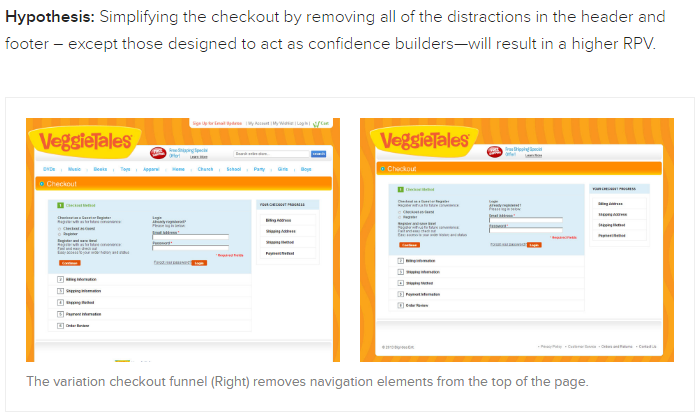
While changes were made throughout the website to various pages, one of the most notable improvements was with the checkout page. The original checkout page contained the same headers and footers as the rest of the site.

veggietales

The navigation was removed, as well as search and contact functionality at the top of the checkout. This streamlined variation produced a 14.3% increase in revenue per visitor and a 42% increase in conversions. (Full case study here)

The Takeaway

When you’re dealing with a conversion point and you want your customers to take a specific action, remove as many distractions as you can and eliminate their ability to click away from the page.

5. Brookdale Living Discovers How to Better Engage Its Audience

Brookdale Senior Living offers community living situations for senior citizens. It was struggling with its original site design which featured a bare bones design (no graphics or testimonials to enhance trust with visitors).

The company created two landing page variations to test against its original home page – one featuring a photo of an elderly woman, and a second variation which housed a brief video in place of the image. Other than the change from image to video, all other elements remained the same.

brookdale case study.jpg

As a result, Brookdale found that the landing page with the image increased conversions by 3.92% (a $106,000 increase in revenue), while the video only increased conversions by .85% over the original. (Full case study here)

The Takeaway

When you have an established brand that your audience is familiar with, a long engagement tool like a video can serve as a distraction. You also need to take into account the target audience – older adults and the elderly may not want to wait for videos to load, or may have a slower internet connection that can be frustrating if they feel they have to wait for a video to get all the information.

Know your audience, and understand how they see and interact with your brand.

6. DMV.org Wants to Lessen Vehicle Owner Frustration

The DMV website is designed to provide useful information to simplify the DMV experience. More than 200 million visitors each year use it as an educational resource. The DMV earns on-site revenue when visitors purchase products like insurance through its partners.

Since the site only makes money when there’s a transaction, the DMV wanted to improve revenue per visitor.

In one test, DMV.org did A/B testing on opt-ins for insurance quotes:

dmv1

The result was a 14% lift in revenue across all content pages featuring that banner. (Full case study here)

The Takeaway

The first banner focused on convenience, counting the steps to get a rate quote. The improved version focused on what mattered more to car owners – getting the lowest rate. Knowing the pain points of your audience and the things that are on their mind can help you better position solutions to get them to convert.

7. BusinesSuites Goes Big with Changes

BusinesSuites is a provider of virtual offices. The company was faced with the challenge of not seeing the level of conversion from its landing pages that it had originally expected. This was troublesome because that’s where the majority of its traffic came from.

Rather than test small incremental changes over time, BusinesSuites opted to go for a massive redesign with its landing page. This included:

  • Limited, more concise copy
  • Fewer form fields
  • Removing location-specific address listings

The results paid off.  After a drastic redesign, BusinesSuites saw an 88% increase in conversions over the previous pages. (Full case study here)

The Takeaway

Sometimes you need to test something big and make a significant change. For smaller businesses, it’s sometimes the better route to go when you need a dramatic improvement in conversions.

8. AvidXchange Gains Insight on Sales Funnel Position

AvidXchange provides a solution for invoice and payment automation, and it has traditionally done well with internal marketing. However, its struggle was with gaining leads from PPC campaigns. AvidXchange took a multi-layered approach to optimizing and testing its landing page to change a number of elements.

avidexchange

The surprising result was the customers who were funneling into the landing page were not end-stage customers, but rather early adopters interested in the service. This knowledge helped the company better position its campaigns and marketing materials, which resulted in a 79% decrease in cost per lead. (Full case study here)

The Takeaway

Sometimes what you’re serving to your customers and your expectations of conversion don’t match up with where they’re at in the sales funnel. Make sure you’re positioning your content appropriately, so you’re not expecting something customers aren’t ready to give.

9. 1-800-Dentist Improves Conversion with Single-Step Optimization

1-800-Dentist faced a challenge where its long-form process was broken into multiple stages with a high drop off in Step One. The problem was that Step One was all vital information, and nothing could be stripped away to reduce it.

1800dentist

To reduce friction in Step One, the company kept only the single most significant field to match prospects with a dentist (zip code) and moved other vital forms into the next steps of the funnel. The result was a 23% boost in conversions in less than a week. (Full case study here)

The Takeaway

Make the entry point as simple as possible. By trimming the form fields for entry without eliminating them (moving them down the funnel), you can reduce friction that costs you conversions.

10. Ancestry.com Improves Conversion with Reduced Choices

Ancestry.com was using a single opt-in page for all of its target audience, no matter how they entered or from where. The company sought to optimize the existing page and create a template from which it could create more custom experiences for the user. This led Ancestry.com to test various button sizes, placement of the CTA versus placement of pricing, placement of imagery, and the reduction of package options down to one choice.

ancestry

As a result, Ancestry.com was able to lift conversions by 20%. (Full case study here)

The Takeaway

This is another case where you’re reducing friction with your audience. When you give multiple package options, the prospect has to decide, research, and take pause. With just one package option, there’s just no choice – buy, or not. It works.

11. MarketingSherpa Improves Conversion During Live A/B Test

At Optimization Summit 2013 in Boston, MarketingSherpa teamed up with Hoover’s to run a live split test for an audience. The team chose a product page and created a variety of change recommendations including headlines, call to action, and changes to the product column.

Overall, the changes were designed to simplify the layout and improve messaging.

The audience then voted in teams on the changes before they were implemented. About 24 hours after launching, the treatment outperformed the control with an 8.1% increase in conversions. (Full case study here)

The Takeaway

Stripping away distractions and putting an emphasis on value messaging (the benefit statements) helps the audience understand how they can benefit – personally – from what you’re selling. It’s the only way they can experience the product if they can’t hold it in their hands.


Which conversion optimization case study caught your attention? Share your thoughts in the comments below.


Image Credits

Featured Image: Jens Kreuter/Unsplash.com
All screenshots by Andrew Raso. Taken May 2016.


Search in Pics: Google Dance Tokyo, gBrau beer & a pink penguin engineer

In this week’s Search In Pictures, here are the latest images culled from the web, showing what people eat at the search engine companies, how they play, who they meet, where they speak, what toys they have and more.

Google pink penguin android figurine:

Google pink penguin android figurine
Source: Google+

Google Dance Tokyo:

Google Dance Tokyo
Source: Twitter

Google Zurich rock climbing wall with Android climbing holds:

Google Zurich rock climbing wall with Android climbing holds
Source: Google+

Google I/O sunscreen packets:

Google IO sunscreen packets
Source: Google+

gBrau, custom beer for Google Munich:

gBrau
Source: Twitter


(Some images used under license from Shutterstock.com.)